Skip to content

Whatcom County Library System

Whatcom County Library System
Log In

Search By
Advanced Search

Search Website

  
  • BOOKS & MORE
    • Child reading with grandmother
    • EXPLORE
      • Recent Activity
      • New Titles
      • Awards
      • Bestsellers
      • Staff Picks
    • BOOKS
      • Find a Book
      • Book Club Picks
      • NoveList Reading Recs
      • Libraries Are for Everyone
      • Surprise Selection
    • DIGITAL
      • ALL Digital Content
      • eBooks, eAudiobooks & eMagazines
      • The Power of Sharing
    • LIBRARY OF THINGS
      • Games, Dolls & Puzzles
      • Light Therapy Lamps
      • Video Games
      • Wi-Fi Hotspots
      • Museum Passes
      • See MORE Things
  • SERVICES
    • Bookmobile with quotation from Nelson Mandela: "When we read we are able to travel to many places, meet many people, and understand the world."
      • LIBRARY INFO
      • Locations & Hours
      • Get a Library Card
      • Bookmobile & Mobile Services
      • Fines Free
      • Whatcom Libraries Collaborate
      • HELP & SUPPORT
      • Accessibility Resources at WCLS
      • Ask a Librarian
      • Community Resources
      • Digital Literacy
      • Professional Certifications 
      • SERVICES
      • Can’t Find It?
      • Printing Request Form
      • Request Meeting Space
      • Schedule Curbside Pickup
      • Surprise Selection
      • Voter Information
  • EVENTS
    • The Library Game. Get a book pocket. Collect cards. Become a legend. Learn more.
      • ALL EVENTS
      • Search Calendar
      • Explorations
      • Online Guidelines
      • ONGOING EVENTS
      • Book Club Picks
      • Storytimes
      • Teens & Kids Events
      • The Library Game
      • SEASONAL EVENTS
      • A Forest of Words
      • Open Book
      • Summer Reading
      • Whatcom READS
      • Whatcomics
  • YOUTH
    • group of teens with librarian holding books
    • AUDIENCE
      • Early Years
      • Kids
      • Teens
      • Educators
      • Homeschool
    • PROJECTS
      • First 500
      • Summer Reading
      • A Forest of Words
      • Whatcomics
    • RESOURCES
      • ConnectED
      • Staff Shelf
      • Kits & Special Collections
      • Museum Passes
    • PROGRAMS
      • Early Years Programs
      • Kids Programs
      • Teen Programs
  • GET INVOLVED
    • Image of two children looking at books and Whatcom County Library Foundation Logo
      • LIBRARY FOUNDATION
      • About the Foundation
      • Give
      • FRIENDS OF THE LIBRARY
      • About Friends Groups
  • ABOUT US
    • All Staff Learning Day group photo for 2024
      • ABOUT WCLS
      • Library Levy Proposition
      • Explorations
      • Land Acknowledgement
      • Locations & Hours
      • News & Podcasts
      • Public Records Requests
      • BOARD OF TRUSTEES
      • About the Board
      • Community Report
      • Library Policies
      • Mission, Vision and Values
      • Strategic Plan
      • WORK WITH US
      • Contact Us
      • Employment
      • Procurement Opportunities

How to set or change your holds pickup location

November 24, 2026 by Neil McKay

Instructions on how to set up single-click holds and to change your pickup location:

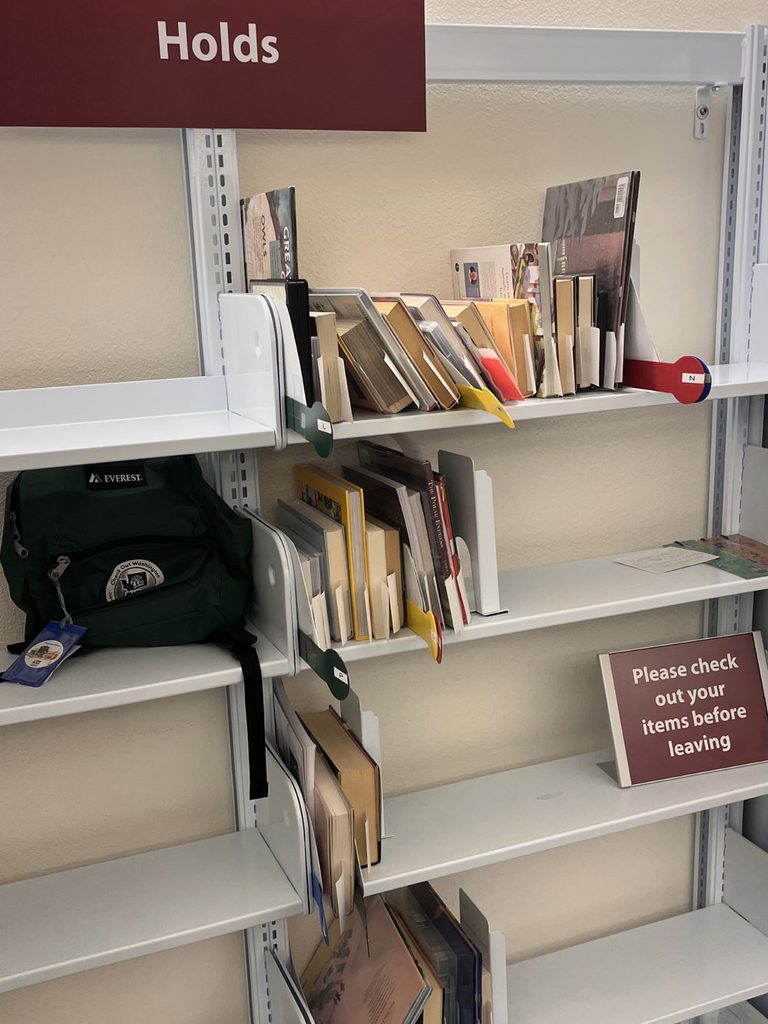
When you find a book or other item in the catalog that you would like to check out, you can place a hold on it and our staff will pull it from the shelf and set it aside for you to check out. You can choose what branch your item will be delivered to and it will be placed on the holds shelf for you there.

Enabling Single-Click Holds
  1. Log in to your account.
  2. On the menu, click My Settings.
  3. On the My Settings page, find the Account Preferences section.
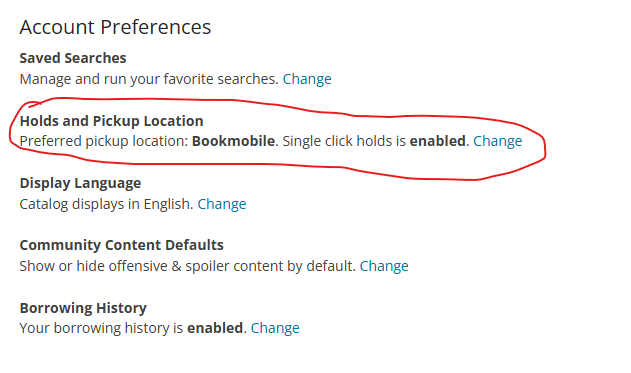
  4. Next to Holds and Pickup Locations, click Change. (see image)
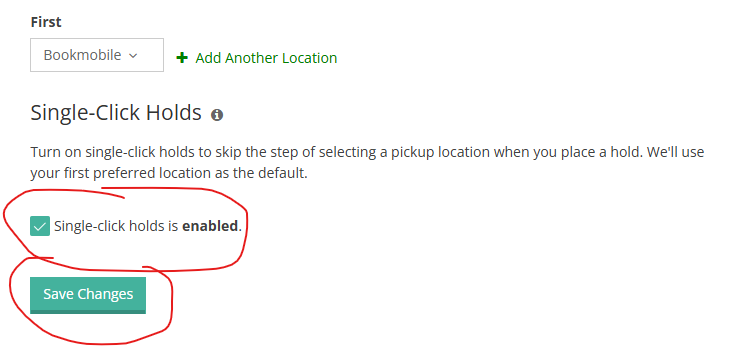
  5. Under Single-Click Holds, click the checkbox next to Single-click holds is enabled. (see image)
  6. Click Save Changes. (see image)
Image of Holds Location form
Click for larger image
Image of Holds Location form
Click for larger image
Image of Holds Location form
Click for larger image

You can also enable Single-click holds from your On Hold page, and when you place a hold.

Changing Your Pickup Location
After you enable single-click holds, you can still change your default pickup location.
To change your default pickup location

  1. Log in to your account.
  2. On the menu, click My Settings.
  3. On the My Settings page, find the Account Preferences section.
  4. Your current default pickup location is shown under Holds and Pickup Locations. Click Change to choose a new one.
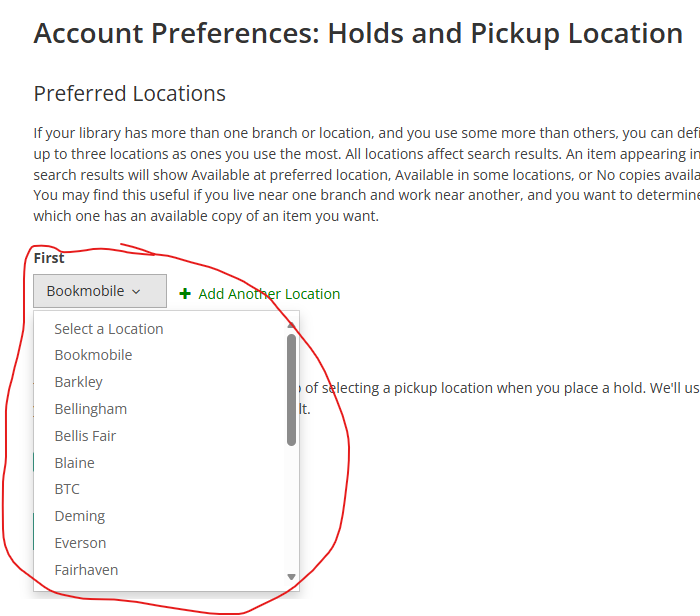
  5. Choose a new pickup location from the dropdown list.
  6. Click Save Changes
Categories Holds, Library Account
NOTICE: All WCLS branches will be closed on Thursday & Friday, November 26 & 27.

ABOUT WCLS  | CONTACT US | EMPLOYMENT

  • Facebook
  • Instagram
  • YouTube
  • RSS Feed
Whatcom County Library System | 360-305-3600 | 5205 Northwest Drive, Bellingham WA 98226
Línea Telefónica En Español (360) 305-3638

 
Sign up for our WCLS Newsletters!

We are on the ancestral territory of the
Nooksack, Lummi and other Coast Salish peoples.
They are the original inhabitants of this place.
They are fishers, hunters, gatherers and harvesters
of nature's abundance, and have been so since time immemorial.
We are neighbors and friends, and we are grateful
for our numerous opportunities to learn, live and grow together,
building lasting relationships so that all may prosper.

(Learn more...)

© 2026 Whatcom County Library System • Built with GeneratePress